
Simplify Your Outdoor Monitoring with Maps Pro

Cellular trail cameras have changed the way hunters, landowners, and wildlife observers monitor activity on their property. Instead of making frequent trips to check cameras, images can now be delivered directly to a mobile device through the Strike Force Wireless app.
But for many users, camera images are only one piece of the bigger picture. Understanding weather patterns, tracking property boundaries, and organizing important locations across the land often requires switching between several different apps.
Maps Pro was designed to simplify that experience.
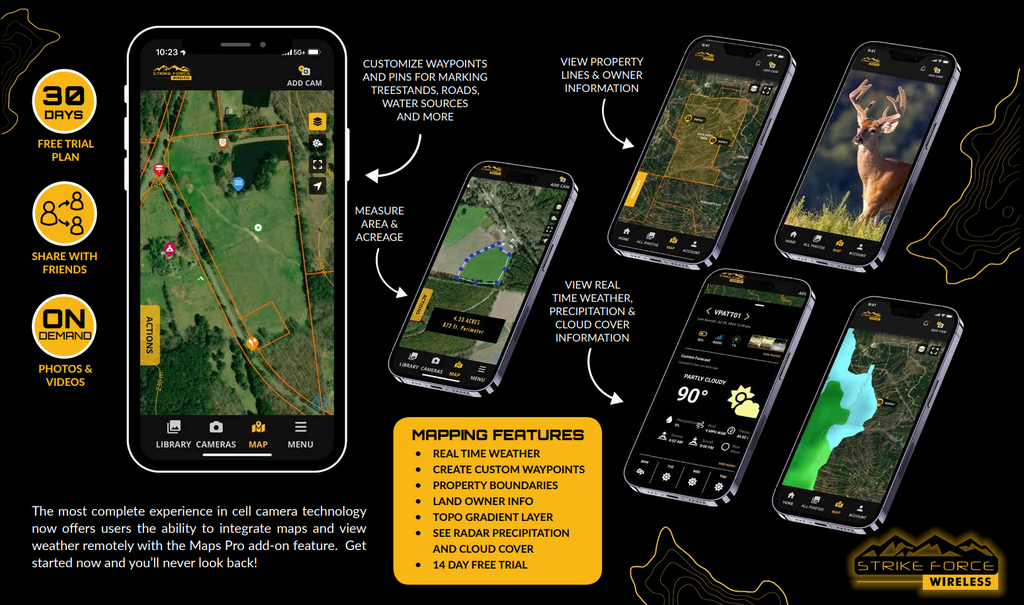
Available as a premium add-on within the Strike Force Wireless app from Browning Trail Cameras, Maps Pro brings several powerful tools together in one place so users can manage their cameras and their property more efficiently.
Mapping Tools Designed for the Field
With Maps Pro, users gain access to detailed mapping layers that help provide better context for trail camera images and wildlife activity.
Topo maps make it easier to understand terrain features such as elevation changes, ridges, valleys, and natural travel corridors. Property line overlays allow users to view boundary information directly within the app, helping landowners clearly visualize their property layout.
Public tax record data also makes it possible to identify neighboring property ownership, offering a clearer picture of the surrounding landscape.
Built-In Weather Information Where It Matters Most
Weather conditions play a major role in wildlife movement and overall outdoor planning. Maps Pro allows users to check current weather conditions and view weather radar without leaving the Strike Force Wireless app.
In addition to current conditions and radar, the built-in weather tools provide valuable information such as temperature, wind speed, wind direction, precipitation, cloud conditions, barometric pressure, moon phase, and time of day. Having this information alongside trail camera images allows users to better understand how changing weather patterns may influence wildlife behavior or activity around their property.
Organize Cameras, Stands, and Key Locations
Another advantage of Maps Pro is the ability to drop waypoints directly on the map. These markers allow users to organize important locations across their property such as trail camera placements, tree stands, feeders, travel corridors, and access points.
Instead of trying to remember coordinates or switching between mapping apps, everything can be organized visually within the same platform used to monitor trail camera images.
Share Camera Access with Friends
Maps Pro also provides additional flexibility when sharing camera images. Users can invite friends to view trail camera photos from specific cameras while maintaining full control over their system.
Shared users are given view-only access, meaning they can see images but cannot change camera settings or modify stored media. Camera owners can also choose exactly which cameras are visible to each invited user, providing a simple way to collaborate without sacrificing security.
A More Complete Trail Camera Experience
Maps Pro was designed for users who want a more complete view of their property and wildlife activity without juggling multiple apps. By combining mapping tools, weather information, and camera management into a single platform, it allows users to stay organized and better understand what is happening across their land.
The Maps Pro premium feature is available for $6.50 per month and can be added directly within the Strike Force Wireless app.
For hunters, landowners, and wildlife observers who want to simplify how they manage their cameras and their property, Maps Pro offers a powerful upgrade to an exceptional platform.


